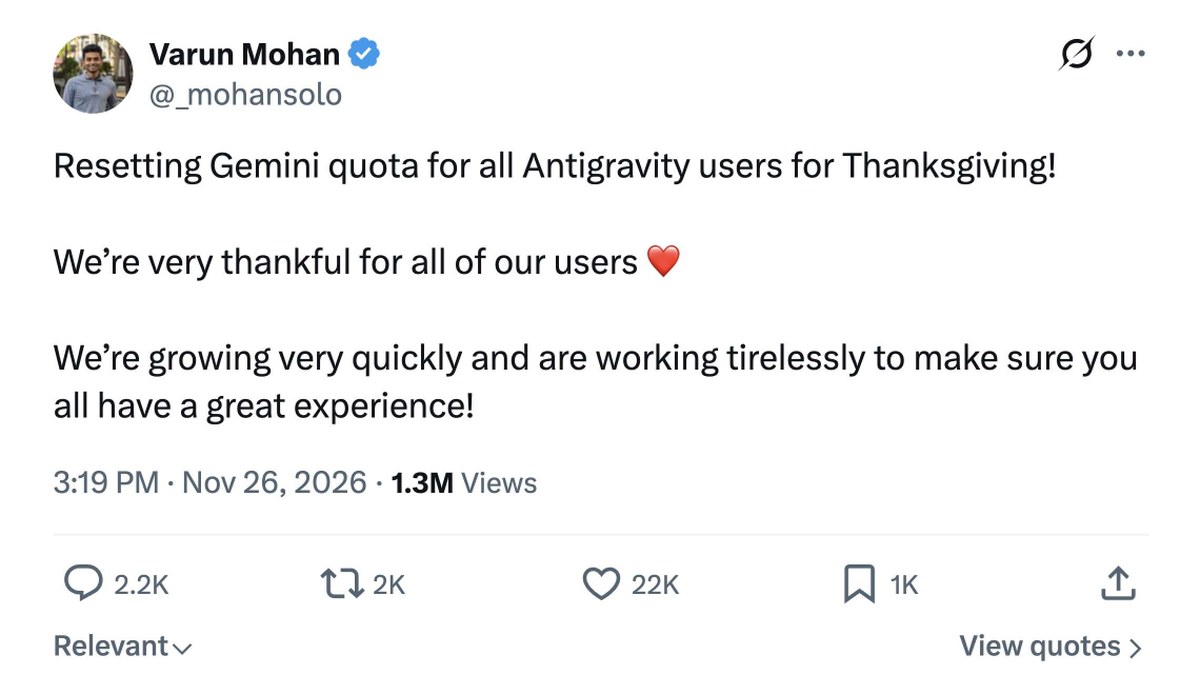
Google reset the Antigravity Gemini quota for every user on November 26, 2026, when Varun Mohan, who builds Antigravity at Google DeepMind, posted “Resetting Gemini quota for all Antigravity users for Thanksgiving!” on X. By an independent tracker’s count it was the sixth reset this month, after a run of caching and harness changes that Google says let the same quota finish far more work on Gemini 4 Neon. A reset refills the quota once. The refresh schedule after it stays the same, and that schedule decides when you hit the limit again.
This guide covers how the five-hour window and the weekly limit combine on each plan, what changed in November (including the models leaving on November 30), how to check your remaining quota, and what to do when it runs out.
How the Antigravity Gemini quota works
The Antigravity Gemini quota is a single shared pool for all Gemini models, limited by two meters at once: a short refresh window and a weekly rate limit. On paid Google AI Pro and Ultra the pool refills every five hours until the weekly limit is reached; on Free and Google AI Plus it refills once a week.
Three rules from Google’s documentation shape how fast the pool drains:
- Work, not prompts. Antigravity’s Plans page says the rate limits “correlate with the amount of work done by the agent.” A quick fix costs little; a multi-file refactor with long reasoning costs much more, so the number of prompts you get varies from task to task.
- One Gemini pool, priced like the API. Since May 19, 2026, Gemini Flash and Gemini Pro no longer have separate limits. Usage is deducted by API price, so if Flash is eight times cheaper than Pro, you can spend eight times as many Flash tokens from the same pool, or any mix of the two.
- Separate meters for other vendors. Claude and GPT models keep their own fixed limits because of capacity constraints. In Antigravity CLI’s quota panel they appear as a separate group, and “the models in a group share a weekly limit and a five-hour limit.”
In practice the weekly limit is the one that can lock you out for days. If you spend the weekly allowance early, a fresh five-hour window does not help until the weekly meter resets.
Antigravity Gemini quota limits by plan
Antigravity Gemini quota limits differ by Google AI plan, and Google states them only in relative terms. The Plans page gives no token or request counts for any tier; the one hard ratio comes from the May 2026 plan change, which set the $100 Ultra plan at five times the token rate limit of the $20 Pro plan and the $200 Ultra plan at twenty times.
| Plan | Quota refresh | Weekly limit | Gemini models in the pool | Overage with AI credits |
|---|---|---|---|---|
| Free and Google AI Plus | Weekly | Weekly rate limit | Gemini 4 Hydrogen (plus Gemini 3.8 Flash until November 30, 2026) | No |
| Google AI Pro trial (standard or promotional) | Lower quota than paid Pro, subject to capacity | Not stated | A more limited set, including Hydrogen | Not stated |
| Google AI Pro (paid, $20/month) | Every five hours | Higher weekly limit | Neon, Carbon, Hydrogen and, until November 30, Argon in one shared pool | Yes |
| Google AI Ultra ($100 or $200/month) | Every five hours, highest quota | Highest weekly limits | Full frontier Gemini lineup | Yes |
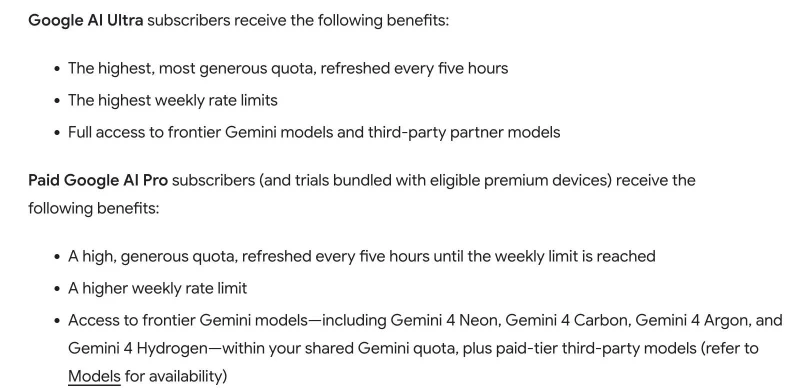 Google Antigravity Docs, Plans, “Baseline quota” section, captured November 28, 2026. Every tier is described in relative terms; no numbers are published.
Two account details catch people out. Google Workspace accounts do not get Antigravity plans or higher rate limits through their Workspace subscription; teams go through Gemini Enterprise instead. And standard or promotional Pro trials get a lower quota and fewer models than paid Pro; only trials bundled with eligible premium devices match the paid plan. On the Google AI Developers Forum, a user on a Jio-bundled Pro plan reported that five prompts on Gemini 4 Hydrogen at High thinking used up a whole five-hour window, and asked whether bundled accounts sit in a smaller bucket than directly paid Pro. Google had not replied when we read the thread on November 28.
The model you pick also changes how far the pool goes. Our Gemini 4 models comparison covers what Argon, Carbon, Neon and Hydrogen are each built for, and the Gemini 4 Hydrogen benchmarks help you pick a thinking level for the fast everyday model.
Gemini quota reset: what the November 26 reset changed
A Gemini quota reset in Antigravity is a manual, all-user refill that Google announces on X, separate from the regular five-hour and weekly refresh. The November 26 reset refilled every user’s Gemini quota over Thanksgiving and came with no change to the plan limits, so the normal refresh schedule applies again from there.
These resets have no fixed calendar. GeminiReset, an independent tracker that is not affiliated with Google, logs 17 confirmed resets since May 21, 2026, with an average gap of 12 days, a median of 7.5 days and a longest wait of 44 days. November was unusually busy: the last four gaps were 4.0, 3.4, 2.5 and 2.5 days. Most resets came from Varun Mohan’s account, and several followed changes that Google said had burned quota too fast or made it go further:
| Date (UTC) | What Google announced on X | Effect on quota |
|---|---|---|
| Nov 17 | Antigravity’s first birthday | Quota reset for everyone across all models |
| Nov 20 | Neon cache pool enlarged, cache hit rate up about 4% | Promised a reset afterwards “since it burned quota faster” |
| Nov 21 | Caching improvements live | Gemini quota reset; Google says quota now covers 22% more work |
| Nov 23 | Models upgraded across tiers: Carbon for paid Pro, Hydrogen for all users | Gemini quota reset for everyone |
| Nov 23 | Separate Argon bucket for paid Pro removed | Argon’s capacity moved into the general Gemini pool |
| Nov 24 | New harness release | On Neon, 12% less quota per task and 17% faster, by Google’s measure |
| Nov 25 | Neon cache hit rate up another 4.5% | 28% more tasks within quota; close to 75% more Neon usage over five days, per Google |
| Nov 26 | Thanksgiving | Gemini quota reset for all users |
The efficiency figures are Google’s own and describe Gemini 4 Neon specifically; your gain depends on how cache-friendly your sessions are. The tracker also warns that an announcement does not prove your own account has refilled, so check the panel before starting a long job.
One date ahead matters for anyone who relies on older models: Gemini 4 Argon, Gemini 3.8 Flash, GPT-OSS-120b and the Claude 4.6 models leave Antigravity on November 30, 2026. Paid Pro users already lost the separate Argon bucket on November 23, so Argon work now draws on the same pool as Neon, Carbon and Hydrogen.
How to check your Antigravity Gemini quota
To check your Antigravity Gemini quota, type /usage (or its alias /quota) in Antigravity CLI and press Enter. The command pulls your current model configuration and quota status from Google’s backend and opens a Models & Quota panel listing the remaining quota for each model group: the shared Gemini group, and Claude and GPT models separately. Close it with Esc or Q.
In the desktop app, the Settings page shows baseline quota usage across models. Either view tells you which meter is low. If the five-hour figure is fine but the weekly one is nearly empty, plan the rest of the week around it; a fresh five-hour window will not add weekly room.
On the Google AI Developers Forum this week, several users posted panels that fell sharply after a handful of prompts, while another showed 99.80% of the five-hour limit left after a one-word “ping”. Checking before and after a typical task is the quickest way to learn what your own work costs.
How to fix running out of Antigravity Gemini quota
Running out of Antigravity Gemini quota leaves three options: pay for overage, stretch the pool you have, or wait for the next refresh.
Pay for overage (Pro and Ultra only). Paid plans can buy AI credits and spend them once the baseline quota for a model is gone. The AI Credit Overages setting controls this: Never stops and waits for the refresh, Always switches to credits automatically and back to baseline quota once it refills. Credits are charged at standard Gemini Enterprise consumption pricing. Since May, AI credits are no longer bundled with Google AI plans, so this is a separate purchase. Antigravity does not support bringing your own API key or endpoint for extra rate limits.
Stretch the pool. Because every Gemini model draws on one pool priced like the API, routine work on a cheaper model leaves more room for the jobs that need Neon or Carbon. Antigravity’s model docs point to Gemini 4 Hydrogen for package upgrades, tests, boilerplate and quick scripts, and to Orchestrator for day-to-day feature work, where a stronger planner hands implementation steps to a faster executor. Thinking level matters too: one paid Pro user’s 20-prompt test, quoted on the forum, used 29% of the five-hour window on Hydrogen at High and 12% at Medium, and 74% versus 39% on Neon. That is a single user’s report, but the direction matches Google’s rule that quota tracks the work done. Our Gemini 4 Neon cost-per-task figures show how far apart the models sit, and quota use in Antigravity Teamwork runs explains why multi-agent jobs drain the pool fastest: every worker and reviewer is another agent spending tokens.
Wait for the refresh. On Pro and Ultra the pool refills every five hours as long as the weekly limit has room. On Free and Plus, and on any plan whose weekly limit is spent, the wait is until the weekly reset. Unscheduled resets like the one on November 26 have come every few days this month, but nothing guarantees the next one.
If you also use Claude models in Antigravity, remember they sit on a separate meter: running out of Gemini quota does not touch your Claude allowance, and the reverse is true too. Claude Opus 5.5 is one of those models on paid tiers; our Claude Opus 5.5 pricing breakdown shows what each effort level costs per task through the API.
References
- Google Antigravity. “Plans.” Google Antigravity Docs, read November 28, 2026.
- The Antigravity Team. “Changes to Antigravity plans.” Google Antigravity Blog, May 19, 2026.
- Google Antigravity. “Model quotas (/usage) – Antigravity CLI.” Google Antigravity Docs, read November 28, 2026.
- Varun Mohan (@_mohansolo). “Resetting Gemini quota for all Antigravity users for Thanksgiving!” X, November 26, 2026.
- GeminiReset. “Gemini reset history.” Independent tracker, read November 28, 2026.