For the past two years, the loudest arguments in the AI coding space have been about models: which one writes cleaner code, which one hallucinates less, which one wins on some leaderboard. That argument is starting to feel incomplete. The tools built around the model — how they manage context, call functions, ask for permission, and persist state across a session — increasingly determine whether an agent is usable at all. This is the harness layer, and it’s where a lot of the real engineering is now happening.
DeepSeek Harness (DSH) is DeepSeek AI’s entry into this space, and it’s a useful case study because its architecture makes an explicit bet: instead of shipping a single opinionated agent loop, it ships a runtime that assembles itself from composable parts. Understanding that bet — and its current limitations — is more useful than debating whether DSH is “better” than any particular competitor. For a concrete alternative architecture, see our DeepSeek Harness vs Pi Agent comparison.
What DeepSeek Harness Is
DeepSeek Harness is an MIT-licensed, open-source agent harness released by DeepSeek AI. According to its official README, the project is explicitly labeled a developer preview, with a direct warning that compatibility-breaking changes should be expected. Architecturally, DSH is built on an “everything is a plugin” model powered by Cordis, an underlying composition framework. Practically, this means DSH is less a single application than a runtime you assemble: model adapters, tools, sandboxing policy, approval logic, session persistence, and the UI layer are all separate, swappable components rather than a hardcoded pipeline baked into one binary.
The Cordis Foundation, Briefly
Cordis is the composition layer underneath DSH — the mechanism that lets independently authored plugins register capabilities, declare dependencies, and be wired together into a running system without each one knowing about the others’ internals. It provides the primitives for lifecycle management (starting, stopping, and reloading pieces of the runtime) and for layering configuration on top of a base set of behaviors.
For the purposes of this article, that’s as deep as we need to go. Cordis has its own mechanics around effect handling and reactive state that are worth understanding if you’re building plugins, but they’re not necessary to evaluate DSH at the architecture level — we’ll treat Cordis strictly as the foundation DSH is built on, not as a subject in itself.
The Runtime Layers, in Plain Terms
It helps to think of a running DSH instance as being assembled, layer by layer, rather than launched as one fixed program:
- Plugins — the units of functionality: a model adapter, a filesystem tool, an MCP client, or a session store.
- Bundles — distributable packages that group plugins and contribute a configuration layer.
- Profiles — named assemblies that choose and order bundles for a particular way of running the harness.
- Declarative patch layers — configuration overlays applied after bundle defaults. They can replace configuration rows without forking plugin code, although an override replaces the row’s full configuration rather than deep-merging one field.
The practical effect is that the “agent loop” you experience — read a task, call a tool, check a result, decide the next step — is not a single hardcoded function somewhere in the codebase. It’s the emergent behavior of whichever plugins and patches are active for that run. Change the profile, and you change what the harness is capable of, without changing its core.
What “Everything Is a Plugin” Actually Changes
The phrase invites eye-rolling if it’s just marketing language, so it’s worth being concrete about what it changes in practice.
First, it means the services most harnesses treat as fixed infrastructure — model adapters, tool execution, approval gating, sandbox policy, telemetry, even the UI — are instead composed as services that can be independently versioned, replaced, or disabled. Want to run without a Web UI at all? Drop that plugin. Want a different session persistence backend? Swap the plugin, keep everything else.
Second, it changes the failure and extension surface. In a monolithic harness, adding a new capability usually means patching a large control loop and hoping you don’t break something adjacent. In DSH’s model, a new capability is a new plugin registered against a defined interface — in principle, a more contained change.
Third — and this is where editorial caution matters — plugin architectures are only as good as their interfaces and documentation. A developer-preview label attached to this codebase is not incidental. Plugin APIs that are still settling are a real cost for teams building on top of them, since a breaking change to a core interface can ripple through every plugin that depends on it.
Model Portability, MCP, Sessions, Approval, and Sandboxing
Model adapters and provider portability
Because model access is itself a plugin category, switching between model providers is a configuration change rather than a code change, at least in principle. DSH’s Web UI exposes provider and model settings directly, which is where this portability becomes tangible for a working developer rather than an abstract architectural claim.
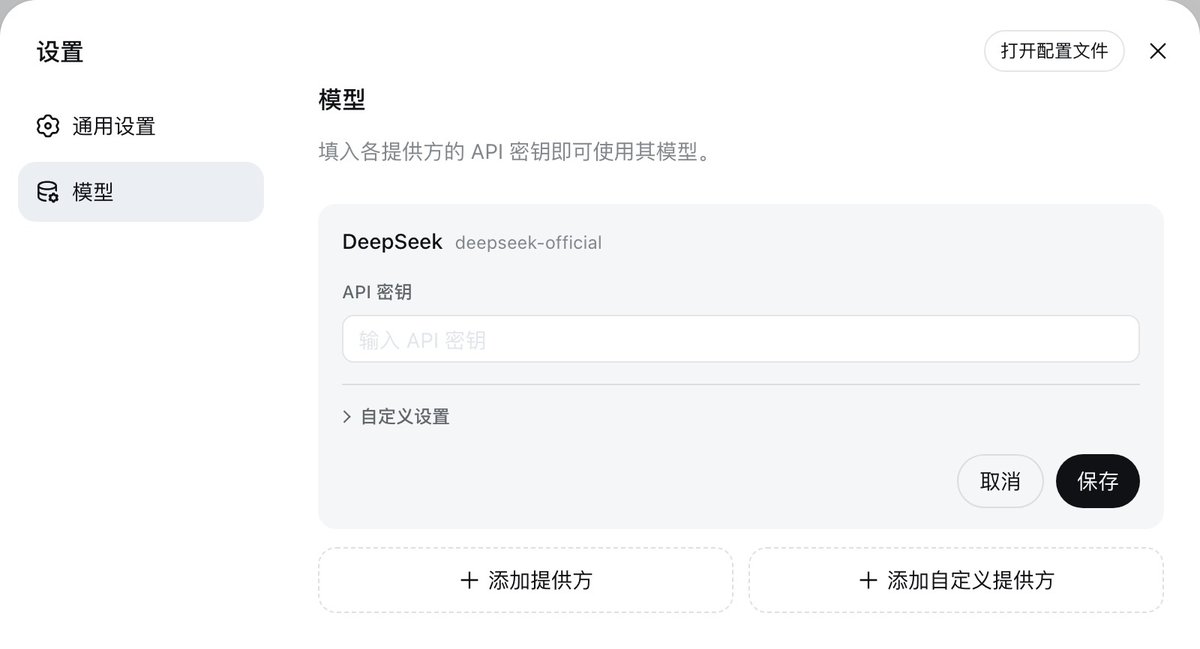
This matters for teams that don’t want to be locked into a single model vendor’s tooling. It also matters for benchmarking and evaluation work, where swapping a model adapter without touching the rest of the harness configuration makes like-for-like comparisons easier to set up.
MCP client
DSH ships a generic MCP (Model Context Protocol) client. It’s worth being precise about what this does and doesn’t mean. For stdio-based MCP servers, DSH ties the server process to plugin lifecycle — meaning it can start and stop the server alongside the plugin that owns it. For HTTP-based MCP services, DSH does not manage the server at all; the service must already be running and reachable. DSH is a client of MCP infrastructure, not an installer or manager of third-party MCP servers in general. If your workflow depends on a specific MCP server being provisioned, patched, or kept alive, that responsibility sits outside DSH.
Sessions and context
Session persistence is handled as a plugin-provided service rather than an implicit detail of the agent loop. This is consistent with the rest of the architecture: how a session is stored, resumed, or inspected is a swappable concern, not a fixed assumption baked into the core.
Approval
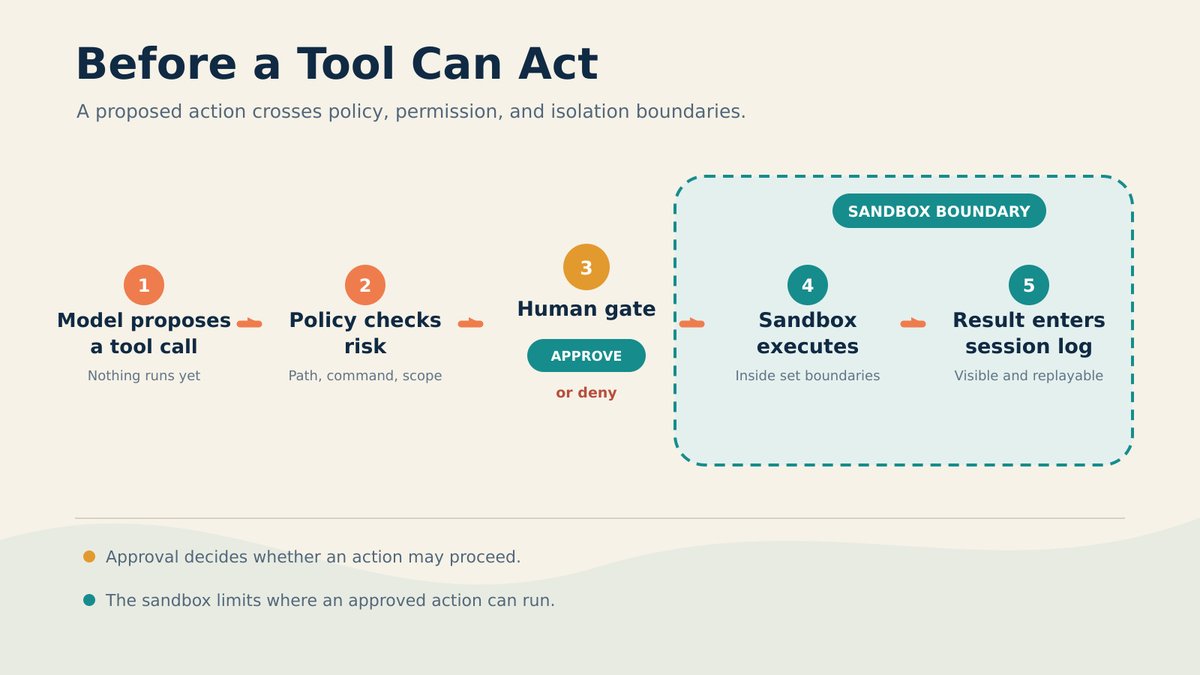
DSH includes an approval service that governs whether an action (a tool call, a file write, a command execution) is allowed to proceed. Two properties are worth calling out directly: it can fail closed, meaning that when something goes wrong or is ambiguous, the default is to block rather than permit — and it supports one-shot human grants, letting an operator approve a single action without opening a standing permission.
Sandboxing
Filesystem effects are governed by sandbox modes: read-only, workspace-write, and danger-full-access. These are useful, well-defined categories for controlling what an agent can touch on disk. It’s important to be precise about their scope, though: network access and process visibility are explicitly outside this sandbox vocabulary. A workspace-write sandbox constrains filesystem writes; it says nothing on its own about whether a tool call can reach the network or spawn a process the operator doesn’t expect. Teams evaluating DSH for anything sensitive should treat the sandbox as a filesystem control, not a general security boundary, and layer additional controls (network policy, process isolation, container boundaries) around it if those matter for their threat model.
Web and headless operation
The most direct way to try DSH is npx @deepseek-ai/dsh web, which launches the Web UI. Because the runtime is plugin-composed, the repository also supports headless and automation-oriented configurations — profiles that drop the UI plugin entirely in favor of programmatic or CI-driven invocation. This is a natural consequence of the architecture: the UI is a plugin like any other, not the thing the rest of the system is built around.
Concrete Use Cases — and Where DSH Isn’t the Right Fit
Where DSH’s architecture is a genuine advantage:
- Multi-model evaluation work. If you need to run the same task against several model providers and compare outcomes, swappable model adapters remove a lot of the plumbing you’d otherwise write by hand.
- Teams that already operate MCP infrastructure. If you have stdio or HTTP MCP servers running for internal tools, DSH’s generic client gives you a harness that speaks that protocol without vendor-specific glue code.
- Experimentation with approval and sandbox policy. Because approval and sandboxing are explicit, separately configurable services, DSH is a reasonable environment for prototyping what a controlled-autonomy workflow should look like before committing to a specific policy elsewhere.
- Internal tooling and automation prototypes where a headless, scriptable agent loop is more valuable than a chat UI.
Where it’s a weaker fit right now:
- Anything requiring API or plugin interface stability. The developer-preview label and explicit compatibility-breaking warning are not boilerplate disclaimers here; they describe a codebase whose extension points may move under you.
- Security-critical automation that assumes strong isolation. The sandbox modes are useful but scoped to the filesystem. Teams that need network-level or process-level guarantees will need to build or bolt on that layer themselves — DSH doesn’t claim to provide it.
- Situations requiring proof of comparative capability. DSH’s repository documents how to run benchmarks yourself; it does not publish results showing DSH outperforming Claude Code, Codex, or Pi. Anyone selecting a harness on the basis of head-to-head capability claims won’t find that evidence here, and shouldn’t assume it exists elsewhere in the project’s official materials.
- Unattended MCP server provisioning. If you’re expecting DSH to stand up and manage third-party MCP servers for you, that expectation doesn’t match how the client is scoped, especially for HTTP-based servers.
Should You Adopt It?
The honest answer depends heavily on what “adopt” means in context.
For experimentation: yes, without much hesitation. npx @deepseek-ai/dsh web is a low-friction way to see the plugin architecture, approval flow, and sandbox modes firsthand. The cost of trying it is low, and the architectural ideas — composable services instead of a single agent loop — are worth understanding even if you end up using a different harness in production.
For internal pilots: reasonable, with guardrails. Teams building internal tools, especially ones that already have MCP infrastructure or a need to compare multiple model providers, can get real value from DSH’s composition model. The caveat is to treat the developer-preview status as a real constraint: pin versions, expect to update integration code when plugin interfaces change, and don’t build anything you can’t afford to rework on short notice.
For production systems, particularly ones with security or compliance requirements: not yet, at least not as a drop-in dependency you don’t actively manage. The combination of an explicit developer-preview label, compatibility-breaking changes as a stated expectation, and a sandbox model that’s intentionally scoped to filesystem effects rather than full isolation means production adoption today requires the adopting team to take on real integration and security engineering — not just configuration. That’s not a criticism of the project; it’s a fair reading of where DSH says it currently stands.
The architecture itself — plugin-composed services, explicit approval and sandbox layers, a generic MCP client — is a sound direction, and one that other harnesses are converging on in various forms. Whether DSH specifically is the right implementation to bet on right now depends less on its design and more on how quickly its interfaces stabilize.