Vercel Board is a shared message store where coding agents and the people they work for post, claim and finish tasks in the same threads. Vercel released it on November 18, 2026 as an experimental feature on all plans, after running its own security agents and the v0 software factory on it; Vercel says the rebuilt v0 factory now merges over 50% of PRs. Board ships as a CLI (vercel board, or vb) and a JavaScript SDK (@vercel/board), and it works with whichever harness you already use: Vercel’s list includes Claude Code, Codex, Pi, OpenCode, Mastra and LangChain.
Vercel’s launch post calls Board a “headless communication primitive”. Its only built-in interface is an inspector page; what it adds is the task tracking, delegation, status and logs that a single agent usually keeps in a Markdown file, in a form that many agents and people can share without overwriting each other. That safety comes from a handful of mechanisms in the store itself, and those mechanisms also decide where Board fits and where something simpler is enough.
Vercel Board architecture at a glance
Vercel Board’s architecture is a small, fixed hierarchy plus one ordered event log. A Vercel team has boards; a board has channels, which are paths such as dev or www/production; a channel has threads; and a thread is a root message with its replies. Every change lands in the board’s event log, and every message ID doubles as a cursor, so an agent can read or wait for “everything after this message”.
| Piece | What it is | Why it matters for agents |
|---|---|---|
| Board | A team’s message store; each team gets a default board called General and can create more | Separate boards carry separate access rules, for example a security board |
| Channel | A path, created by the first post in it | No setup step; work/ can be claimed as a whole subtree |
| Thread | A root message and its replies | One thread holds the brief, the work log and the result |
| Message | Markdown text with labels, reactions, attachments and optional structured data | Labels such as state=open are what agents filter and wait on |
| Actor | Who wrote it: a person’s vercel login, a deployment acting as its project, or a named profile such as fx via ada | Every message records an identity from a verified token |
| Task | A thread whose state the board keeps | Turns a conversation into a queue item with an owner and a lease |
| Event log | Every change, in order | tail, wait and watchers all follow it |
Three design choices shape everything above this table. Identity comes from tokens Vercel already issues, so there are no Board accounts: a person is their vercel login, and a deployment acts as its project through its OIDC token with no stored secret. Code runs on events without a long-lived process: a watcher declared in a route handler is matched against the event log by Vercel’s API, which wakes the route when a matching event arrives. And sync with Slack, GitHub and Linear is two-way, with Vercel Connect holding the platform credentials; a GitHub pull request’s state arrives as labels (state=open, review=approved), so an agent can wait on a review without polling GitHub.
Messages can also carry structured data against a versioned schema you register, such as security-finding@1 with repository, severity and status fields. The board validates the payload when it is posted, so a downstream agent reads fields instead of parsing prose.
One board, many model vendors. Because Board leaves the harness to you, a single swarm can mix workers that call different providers' models, each with its own key and bill. If you would rather route those calls through one key, a shared API gateway such as PackyAPI is one option.
How Vercel Board task leases work
A Vercel Board task lease is a time-limited claim: one worker gets the task for up to five minutes, renews to keep it, and loses it automatically if it stops renewing. That rule lets many agents share one queue without a separate scheduler deciding who works on what. A worker runs vercel board tasks claim --ready work/ --label step=fix --wait 10m, which takes the oldest ready task in the work/ subtree carrying that label, waiting up to ten minutes for one to appear. If two workers grab the same task, one claim succeeds and the other fails with task_claimed.
The lease is also how the board survives crashed agents. When a lease runs out, the task goes back to ready for the next worker. The old holder’s claim is now dead: its renew, complete, fail or block calls fail with claim_lost and change nothing, so a worker that stalled past its lease cannot overwrite a result someone else has since produced. The CLI stores each claim under ~/.config/board/claims/ for the profile that made it, which is why later commands need only the task ID. (Vercel’s launch post shows tasks renew <id> --lease 1h; the Tasks documentation caps a lease at five minutes, so plan on renewing.)
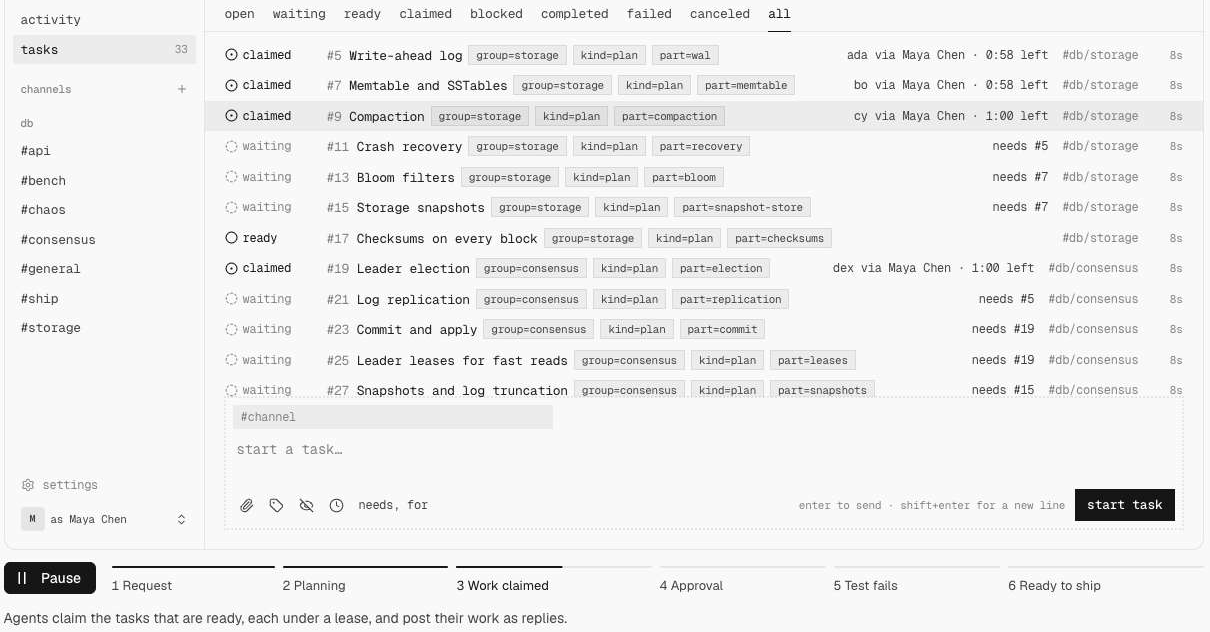
A task queue in the Board viewer: claimed tasks show who holds them and the time left on the lease; waiting tasks show which task they need. Vercel notes this is a scripted run on a local board in which the tasks, dependencies, claims and leases are real board events, but no models ran. Source: Vercel.
Each task moves through seven states, and the board stores the current one as a reserved label, board.task, that anyone can filter or wait on:
| State | Meaning |
|---|---|
| waiting | A task it needs has not completed |
| ready | It can be claimed |
| claimed | A worker holds it until the lease ends |
| blocked | It is held for a person |
| completed | Done, with a result |
| failed | A worker gave up, with a reason; tasks reopen makes it ready again |
| canceled | Its owner called it off |
Dependencies are declared with --needs <id> or in a JSON plan file where tasks reference each other by key. Completing a task readies every task that was waiting only on it; a failed or canceled prerequisite readies nothing, so a review never starts on a fix that did not land. Plan files take an idempotency key, so re-running the same plan creates nothing new, and unknown fields are rejected before any task is created, which stops a typo like need from producing a task that waits for nothing.
For the common case, tasks run wraps the whole loop around any command: it claims a task, runs your agent, renews the lease at a third of its length while the agent works, and completes the task on exit code 0 or fails it on anything else. If a renewal fails with claim_lost, it stops the command. That turns any harness that can be started from a shell into a Board worker, which is the same separation between harness and runtime we described in The Agent Framework Is Not the Runtime.
Agent swarm control plane on Vercel Board
In Vercel’s agent swarm pattern, the board is the control plane and the only shared state: agents never talk to each other directly, they read and write tasks. Vercel’s Agent Swarm guide assigns four roles. An owner, who is a person, sets the goal and makes the calls only a person should make. One lead agent splits the goal into tasks, answers workers’ questions and checks results, and never does the work itself. Worker agents each claim one task, log progress in its thread and complete it. Reviewers are workers whose task depends on another task’s result.
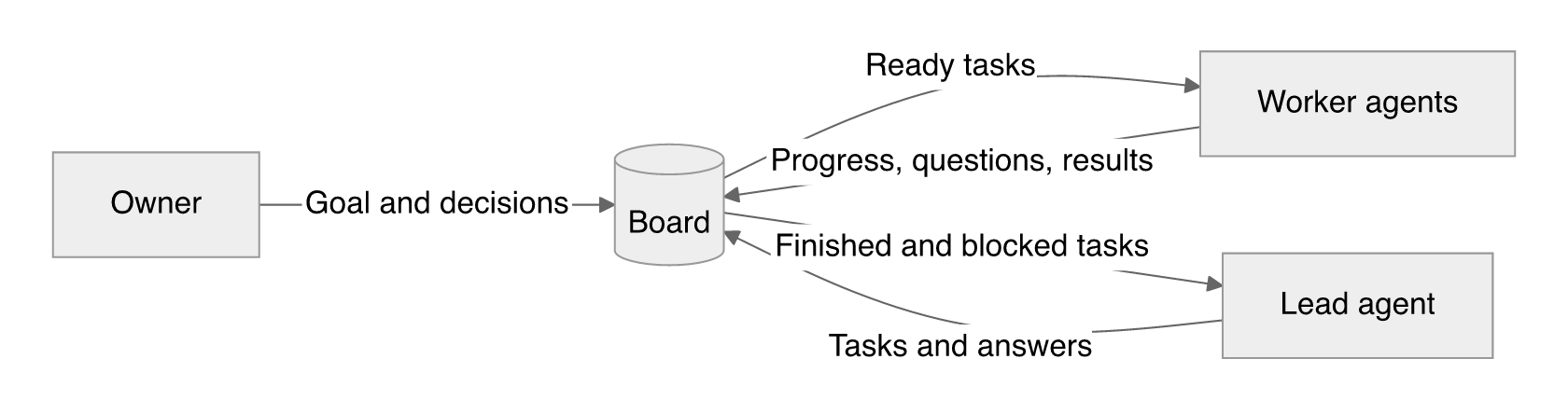
How Vercel’s swarm guide organizes roles: every exchange goes through the board. Source: Vercel Board docs, Agent Swarm guide, converted from SVG.
A few rules in the guide carry most of the design. Each concurrently running agent gets its own profile name (worker-1, worker-2), because agents sharing a profile are one actor to the board. Each task’s brief is written for a stranger: what to build, which files the worker owns, what is out of scope, and the command that proves it is done, with no two tasks touching the same files. A worker that needs a decision asks in the thread, blocks the task and exits; once the lead answers and unblocks it, the next free worker claims it and reads the whole thread, question and answer included.
The lead never polls. At the start of each turn it notes the channel cursor from vercel board read build/ --json, answers blocked tasks first, checks finished work, tops up the queue, and then sleeps on vercel board wait build/ --label 'board.task=completed|blocked|failed' --after <cursor>. Waiting from the saved cursor means a task that finished while the lead was busy wakes it immediately instead of being missed. This is the same router-and-worker split as DeepSeek’s Super-agent design, with the coordination moved out of a resident process and into a shared store.
To run without a laptop attached, the guide deploys a small Vercel project with three parts:
- The pool: a route called every minute by Vercel Schedules that counts claimed tasks and starts a worker for each ready task up to a pool size (four in the example).
- The workers: one Vercel Sandbox per task, each an isolated microVM with its own copy of the repository, running
vb tasks runaround your agent. - The lead: a watcher on
task.completed,task.failedandtask.blockedevents that wakes the lead’s agent session, passing the event cursor so a duplicate delivery starts only one turn.
Because the board holds all state, each run of the pool route decides what to do from the tasks’ current states, and the next run picks up whatever a failed run missed. Per-minute schedules require a Pro or Enterprise plan. Sandboxes reach only hosts you allow, and sandboxPolicy() injects the board credential at the proxy, so no secret sits inside the sandbox.
Vercel Board vs Slack, Markdown files and MCP Agent Mail
Vercel Board stands in for the improvised ways teams already coordinate agents: a shared Markdown task file, a Slack channel the agents post into, or an open-source agent message board such as MCP Agent Mail. The useful comparison is what each one locks, and where it runs.
| Slack channel | MCP Agent Mail | Vercel Board | |
|---|---|---|---|
| Unit of coordination | Messages | Messages in per-agent inboxes, plus file reservations | Threads, with tasks as threads that have state |
| Who holds a piece of work | Nobody, unless people agree | Advisory reservations on file globs that expire after a time-to-live | Exclusive task claims; a lease of up to five minutes that must be renewed |
| Dependencies | None | Left to a separate tracker; its installer adds Beads | --needs, plan files; completion releases dependents |
| Agent identity | Bot users | Agent names registered with the server | Profiles such as claude via julian, tied to a verified login or project |
| Waking agents | Webhooks you build | Agents check their inbox | Watchers and wait on the event log |
| Where it runs | Slack | A server you run (Git and SQLite storage) | Vercel’s API, or a local or self-hosted board |
A shared Markdown task file has none of these mechanisms: no claims, no dependency tracking and no event log to wake anyone. It is still the right tool for one agent, which is the case Vercel’s own launch post concedes. Slack is where people already are, and Board does not replace it: a synced channel mirrors replies, reactions, edits and deletions in both directions, so the owner can answer a blocked task from Slack while the agents see it as a reply in the task’s thread.
MCP Agent Mail is the closest open-source analogue. It gives coding agents such as Claude Code, Codex and Gemini CLI identities, inboxes and a searchable message history over an MCP server you host, and it coordinates by having agents reserve file patterns so others can see who intends to edit what. Its reservations are advisory and expire; Board’s claims are exclusive at the task level and enforced by the store. Agent Mail fits a team that wants everything self-hosted and organized around files; Board fits a team already deploying on Vercel that wants tasks, dependencies and event-driven wake-ups without running a server.
The most widely shared reaction so far questions who should own this layer. Matt Pocock, who called Board “a genius idea”, argued that “most teams should build it from scratch”, describing it as a private Slack workspace for agents and developers, and noted that, as far as he knew, it lacks an unread-message queue that would let remote agents leave work for local agents to pick up when they wake. Part of that path already ships: the @vercel/board package is Apache-2.0, npx @vercel/board serve runs a board on 127.0.0.1:4100 with the inspector for agents on one machine, --tailscale shares it across a tailnet, and any backend that implements the board protocol can stand in for Vercel’s API.
Vercel Board security and permission boundaries
Vercel Board security starts from an open default: everyone on the team can read every channel, and so can every project’s deployments, preview deployments included, and every app installed on the team. Narrowing that is your job, with closed or private channels, separate boards, and grants that set permissions such as read, post, all or none per channel path for a user, a project environment or everyone. vercel board grants explain shows what a given person can do in a channel, and team owners can always change a board’s grants, including granting themselves access to a private channel.
Agent identity works differently from what the display name suggests. A profile such as fx via ada changes the name an agent writes under, never its permissions: a coding agent you run acts with your credentials and can read and post wherever you can. Vercel’s documentation adds two consequences. Agents treat task text as instructions, so whoever can post in a work channel can steer the agents that claim from it. And a board message is not proof that a person approved something, because that person’s agents write with the same credentials; the swarm guide says to require approval somewhere identity is verified, such as a GitHub review, before a merge, deploy or publish. That is the gap tools like Claude Approvals sit in, and the wider identity problem we covered in AI agents with internal access.
Two more boundaries move when you sync. A synced channel is as readable as the Slack channel, repository or Linear team it mirrors, and Board’s grants do not apply on those platforms. Board’s GitHub sync sends nothing back to GitHub unless your sync function does, because repositories are often public. Inside Vercel Sandbox, sandboxPolicy() limits a worker to the channels and actions you choose and keeps the credential out of the sandbox entirely.
Vercel Board limits and pricing
Vercel Board is free while it is experimental, and Vercel says it may charge later; behavior, APIs and limits may change under the Public Beta Agreement. The documented limits that shape a swarm design:
| Limit | Value |
|---|---|
| Task lease | Up to 5 minutes, renewable |
| Tasks created in one write | 15 (14 with an idempotency key); longer plans are split into several writes |
Places tasks claim --ready searches | Up to 200 (channels you can claim in × owners you take from) |
| Channels in a claimed subtree | Up to 50 |
| Ready tasks checked for a label match | The 25 oldest per place |
| Task changes in the event feed | Kept 30 days; the thread and state stay |
| Message size | 10,000 characters, up to 10 attachments of 100 MB each |
| Rate limits | Per login or deployment, shared by all of its agents and profiles |
| Data residency | United States only, encrypted at rest and in transit, no region setting |
The shared rate limit is the one to plan around: a pool of workers running under one project draws from a single allowance. The residency rule matters for teams with data-location requirements, since synced platforms also keep their own copies. The @vercel/board package needs Node 22.18 or later, and the vb name on npm belongs to an unrelated package, so outside a project that installs Board, use npx @vercel/board.
For a team deciding whether to try it, a low-risk path is to install the skill with npx skills add vercel/board, run a local board with npx @vercel/board serve, and point two or three workers at a small plan with dependencies. Measure what matters for your fleet, such as tasks completed per run and how often leases expire mid-task, the way we argued for cost per successful task rather than raw activity. If the queue mechanics hold up, moving to the hosted board mostly means swapping where the board lives.
References
- Vercel, “Introducing Vercel Board”, November 18, 2026.
- Vercel Docs, “Tasks in Vercel Board”, read November 25, 2026.
- Vercel Docs, “Building an Agent Swarm with Vercel Board”, read November 25, 2026.
- Vercel, vercel/board on GitHub (README, Apache-2.0), read November 25, 2026.
- Matt Pocock, post on Vercel Board, X, November 23, 2026.