DeepSeek Harness has four built-in agent modes: Standard, PTC, Minimal, and Creator. Standard is the general-purpose coding agent. PTC keeps Standard’s capabilities but orchestrates tools through generated code. Minimal exposes only persistent Bash and a file editor. Creator adds runtime inspection and self-modification tools and therefore requires shell-level trust. This comparison is verified against DSH v0.1.0-rc.7 (99f6f02).
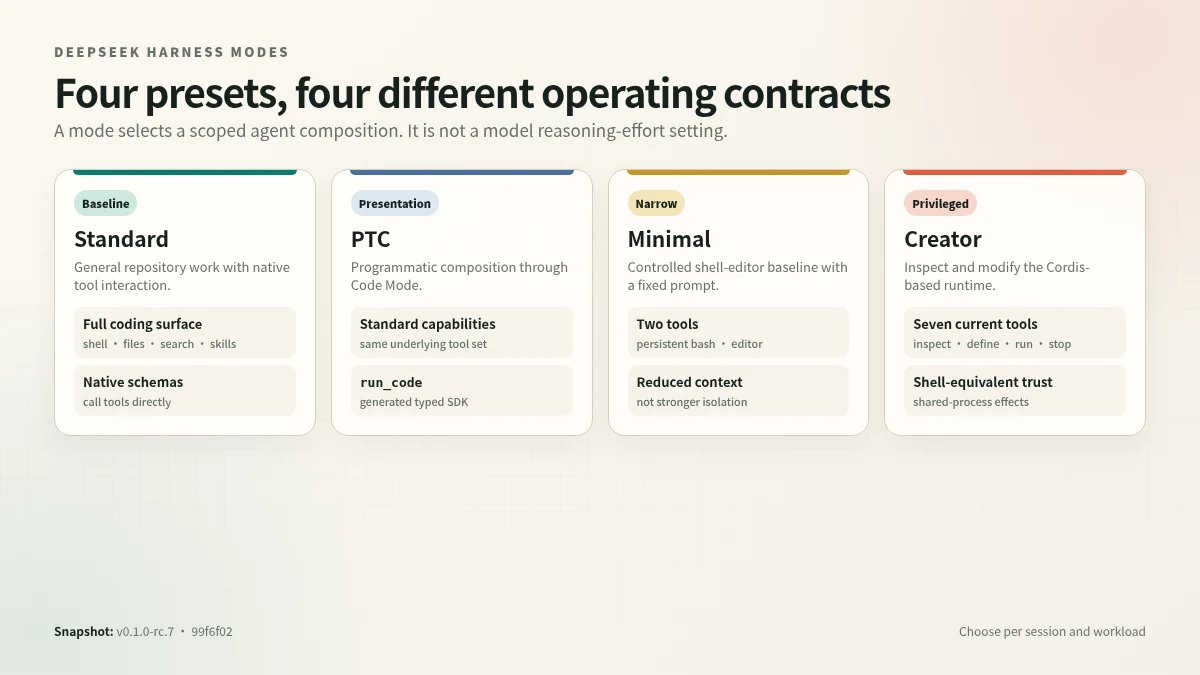
The four shipped presets change different parts of the operating contract: baseline capability, presentation, surface area, or runtime privilege.
DeepSeek Harness Modes at a Glance
| Mode | Best for | Tool model | Key limitation |
|---|---|---|---|
| Standard | Everyday repository work | Full toolset exposed as native calls | More tool schemas and intermediate results enter the model loop |
| PTC | Multi-step, tool-heavy orchestration | Full Standard toolset behind generated SDK + run_code | Side effects are not rolled back; gains are workload-dependent |
| Minimal | Benchmarks and controlled baselines | Persistent Bash + str_replace_editor | No web, skills, goals, subagents, workflows, or compaction |
| Creator | Trusted runtime extension and preset authoring | Standard plus Cordis inspection and dynamic-package tools | Shell-equivalent trust; effects may reach the shared process |
Short recommendation: start with Standard. Choose PTC Mode when measurement shows that programmatic orchestration helps. Use Minimal for controlled evaluation. Reserve Creator Mode for trusted runtime modification.
Agent Preset Model
A mode selection does not adjust model reasoning effort or sampling parameters; it selects which tools and prompt contributions an agent session operates with. Each mode corresponds to a preset directory containing preset metadata and an agent.cordis.yml composition file.
The runtime mounts a preset once per process as a standing composition under a scoped context. Sessions that name the preset join by parenting their agent scope key to the mount’s scope chain (dsh-scope), resolving registrations in the order agent → preset → global with nearest shadowing farthest. Because the mount’s plugins key their state by Session/Agent, multiple sessions share one standing instance while remaining isolated.
Tools registered via dsh-tools and prompt sections registered via dsh-system-prompt file into the mount’s scope layer; the parent-chain mechanism carries them to every agent parented under that preset while a sibling preset’s registrations stay invisible. Joining is a synchronous bind (composeFrom), not a second mount, so it has no composition failure mode.
Standard Mode
Standard is the default and most complete preset in DeepSeek Harness, serving as the full coding-agent baseline. Its metadata describes it as a full coding agent supporting file editing, shell, file and web search, Skills, planning, goals, subagents, and workflows.
The preset is an agent-plane composition mounted once per process. Each session that names Standard joins by scope parentage, inheriting the registered tools and prompt sections while maintaining per-session state. Model-facing tools such as @deepseek-ai/dsh-tool-bash and @deepseek-ai/dsh-tool-web register into the preset’s scoped catalog; explicit isolate realms are reserved for services genuinely owned by that preset.
Host-plane services—persistence, the sandbox and approval stack, model routing, and shell environment injection—remain outside the preset composition. The design criterion is that any service requiring injection before a session exists belongs to the host plane. Consequently, Standard does not own sandbox execution or approval logic; it only exposes the model-facing tool interfaces that invoke them.
Use Standard when the model should call native tools directly and needs the general workflow without restricting available capabilities. Because it mounts every supported tool category, it is ordered first (order: 1) among presets. For narrower tasks, other presets can omit tool groups, but Standard assumes no such constraint.
PTC Mode
PTC Mode preserves the full Standard capability set—every tool available in Standard remains available—but changes how those tools are presented to the model. Instead of exposing one tool call per action, the harness generates a typed SDK (TypeScript or Python, selected by the active codeRuntime.language) and the model composes multi-step operations as a single program executed through the reserved run_code transport. A sequence that would otherwise require multiple round trips collapses into one run_code invocation containing nested SDK binding calls.
The generated SDK declares exact argument and output types for every visible tool in the session’s scope. Each binding call inside the program re-enters the full tool pipeline under the native scheduling contract—concurrency-safe calls may overlap up to maxParallelSubCalls, while exclusive calls act as ordering barriers. Under the code presentation the model may only invoke run_code directly; a model-direct call naming any other tool resolves to UNKNOWN_TOOL before any guard or approval logic executes.
The acronym “PTC” is not expanded in the checked source material. Because the mechanism batches what would otherwise be separate tool-call rounds into a single program, token savings are inherently workload-dependent—tasks requiring many sequential tool invocations benefit more than single-action tasks. Deployment requires a host composition that provides a compatible code runtime; a preset missing that dependency fails at mount rather than at request time.
Minimal Mode
Minimal mode is a fixed-prompt, two-tool coding-agent composition that exposes only persistent bash and str_replace_editor to the model. The persona constitutes the complete system prompt; global identity sections, web-orientation text, tool-guidance listeners, and runtime context snapshots are all suppressed, and context compaction is absent.
The two tools share host infrastructure. The persistent shell consumes the host sandbox policy and subprocess implementation while registering into an agent-scoped tool catalog; the local filesystem provider shadows the host’s sandboxed provider within an isolated realm. Browser, workspace, persistence, and permission mechanisms therefore remain those of the broader harness runtime, even though the model-facing surface is narrower.
This smaller surface suits controlled evaluation scenarios—benchmarking coding ability against exactly two tools with a known, short prompt—but it is not equivalent to stronger isolation. The sandbox boundary and permission model are unchanged from other presets; what shrinks is the set of capabilities the model can invoke and the prompt material it receives.
Creator Mode
Creator Mode is a self-referential extension of the Standard preset: it preserves the Standard capability baseline and adds the Cordis toolset, whose current generated catalog exposes seven model-facing tools over the live runtime of the DSH process. Its purpose is to let an agent author another agent—inspecting the composition it runs on, experimenting with dynamic packages, and writing new preset files.
The added surface comprises three functional areas. First, live Cordis inspection is split across cordis_inspect_list, cordis_inspect_query, and cordis_inspect_self. Second, dynamic-package lifecycle tools (cordis_define, cordis_run, cordis_stop, and cordis_undefine) let the model define, activate, and tear down packages in process memory; these packages disappear on stop, undefine, toolset unload, or DSH restart, create no file, and cannot be promoted automatically. Third, preset-authoring guidance teaches composition structure and the two-plane model so the agent places edits correctly.
The official trust stance equates a Creator session with shell access. The current activation tool, cordis_run, evaluates a defined package’s model-written JavaScript against the live runtime; the preset file still contains one stale narrative reference to the former cordis_mount name. The sandbox isolates globals but is explicitly not a security boundary, and packages controlled by one session may affect other sessions sharing the same process.
Tool Presentation Boundary
The fundamental distinction is between which capabilities exist in the tool registry and how those capabilities are exposed to a mounted agent. A deployment composes a set of tools; a harness mode then selects a projection over that set, determining the schema surface the model sees and the execution surface it may invoke.
| Mode | Presentation mechanism | Visible surface | Execution rule |
|---|---|---|---|
Standard (native) | Every tool schema presented directly | Full registry | Model calls any tool by name |
PTC (code) | run_code transport plus generated SDK section | run_code + typed SDK bindings | Only run_code callable directly; other tools accessed via SDK bindings that re-enter the native pipeline |
| Minimal | Reduced capability set | Subset of registry | As per underlying mode |
| Creator (Cordis) | Adds self-referential tools (cordis_define, cordis_run, etc.) | Extended registry including tools that modify runtime behavior | Dynamic packages may affect other sessions in the same process |
Under native, presentation applies immediately. Under code, the presentation waits for ctx.codeRuntime—a host-plane worker-thread service—and refuses the mount if no runtime is composed. This prevents optimistic application that would defer failure to the first request. The SDK section regenerates deterministically (lexicographic tool order, byte-identical for unchanged sets) to remain prefix-cache-friendly.
The executor enforces alignment between announced and callable surfaces: under code, a model-direct call naming any tool other than run_code resolves to UNKNOWN_TOOL. Creator mode’s Cordis toolset is orthogonal to this projection—it adds inspection and lifecycle tools whose dynamic packages can affect future turns and other sessions within the process, though ownership remains session-scoped and definitions do not survive restart. Presentation is fixed at agent composition time; the request prefix is stable for the session’s lifetime.
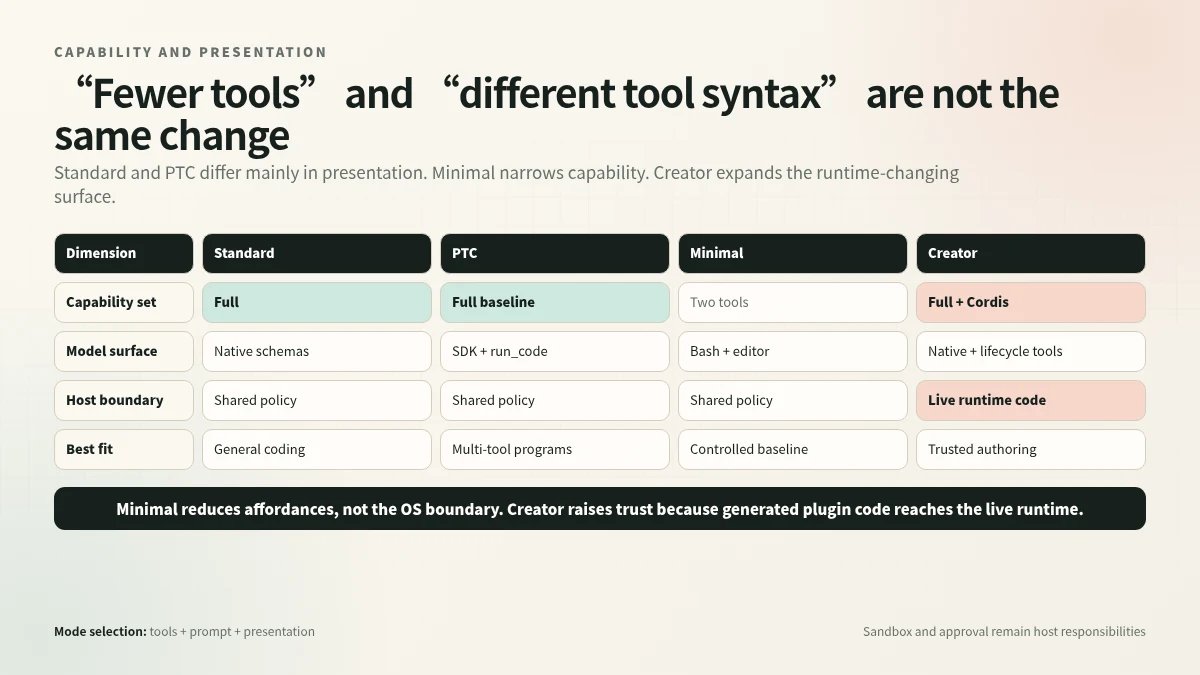
Standard and PTC mainly differ in presentation; Minimal narrows capabilities; Creator adds a runtime-changing surface.
Session Switching
The central distinction is between a blank session and one that has produced history: a blank session may be recomposed to another preset via recompose(agentCtx, id), but once a session has generated output its composition is locked. Changing the user default (defaultId) affects only future sessions, not any currently running one.
Generation stamping. Each composition generation records the file’s mtime and size. A session that detects a stale stamp starts a new generation, while every session already joined keeps the generation it originally mounted. The composition a running session joined outlives the file changing or disappearing underneath it. Deleting a locally authored preset likewise leaves joined sessions on their standing mount.
Practical effect. Editing a composition file mid-conversation does not alter the behavior of sessions already bound to the previous generation; those sessions continue under the snapshot they joined. Only a session created after the edit—or a blank session explicitly recomposed—will pick up the new content.
Trust Gradient
The primary distinction across presets is the scope of model-facing capability, not the presence or absence of an OS isolation boundary. Every preset—minimal, standard, and creator—executes within the same host composition that owns the sandbox and approval stack. Reducing the tool roster limits what the model can attempt but does not introduce a new process or kernel-level containment layer.
| Preset | Model-facing tools | Runtime code generation | Host sandbox dependency |
|---|---|---|---|
| Minimal | bash, str_replace_editor | No | Yes — backend consumes host sandbox policy |
| Standard | Adds tool-web and broader context | No | Yes |
| Creator | Adds Cordis inspection and lifecycle tools | Yes — plugin code evaluated in sandbox | Yes |
Minimal’s two-tool surface means fewer request paths the model can exercise, yet its shell backend still “consumes the host sandbox policy and subprocess implementation”. The constraint is informational: the model sees fewer affordances, but the operating-system boundary is the same one every preset shares.
Creator carries the highest trust requirement because cordis_run evaluates model-generated host-half code inside the live runtime. The evaluation sandbox “isolates globals but is not a security boundary”; Node globals redirect to Cordis services, yet “host-realm helpers make escape possible” and “allowed services affect the live runtime”. The documentation explicitly states: “Treat this toolset like bash access”. Consequently, enabling the creator preset demands the same confidence an operator would place in unrestricted shell execution, compounded by the fact that dynamic plugins persist beyond a single invocation and can register new tool schemas into the session.
How to Choose a DeepSeek Harness Mode
Choose Standard as the default for everyday coding tasks. Move to PTC only when the same representative tasks show better success rate, retained-token cost, latency, or reviewability. Minimal is useful when you intentionally want a two-tool baseline, not when you merely want a safer Standard session. Creator carries the broadest privilege set and should be reserved for sessions that intentionally modify DSH itself.
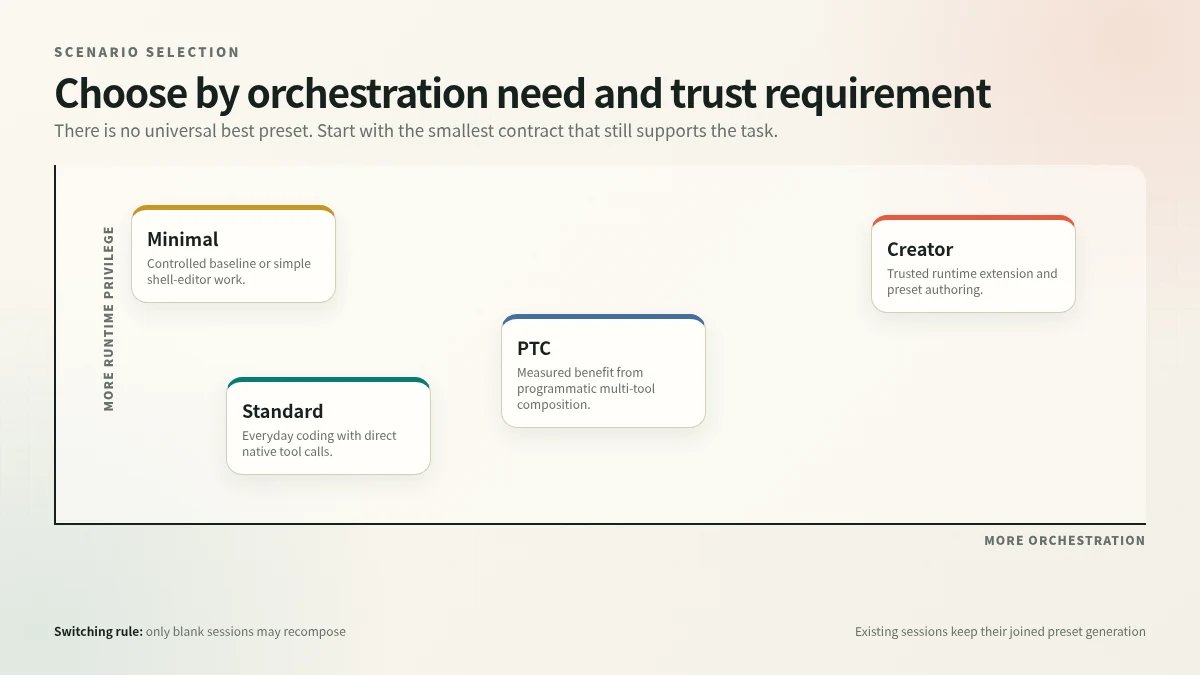
Start with the smallest operating contract that supports the task, then increase orchestration or runtime privilege deliberately.
For implementation details, continue to How DeepSeek Harness PTC Mode Actually Works and DeepSeek Harness Creator Mode: How It Works and Its Risks.
DeepSeek Harness Modes FAQ
Which DeepSeek Harness mode should beginners use?
Standard Mode. It exposes the full general-purpose coding workflow without PTC’s program layer or Creator’s runtime-changing privileges.
Is PTC Mode more capable than Standard Mode?
It has the same underlying capability set. The difference is presentation and orchestration: PTC routes tools through a generated SDK and run_code.
Is Minimal Mode the safest mode?
Not automatically. It presents fewer tools to the model, but it uses the same host sandbox and approval infrastructure. A smaller tool surface is not a new operating-system isolation boundary.
When should Creator Mode be enabled?
Only for trusted runtime inspection, Cordis plugin experiments, or custom preset authoring. Treat it like shell access.