DeepSeek Harness PTC Mode keeps Standard Mode’s full toolset but changes how the model calls it. Instead of invoking one native tool at a time, the model writes a TypeScript program against a generated Code Mode SDK and executes it through run_code. This can collapse multi-step work into one model round trip and keep intermediate values out of conversation context. It does not add transactional rollback, and the reviewed source does not expand PTC as “Plan-Then-Code.” This guide is verified against DSH v0.1.0-rc.7 (99f6f02).
| Question | Short answer |
|---|---|
| What changes in PTC Mode? | Tool presentation: native schemas become a generated SDK plus run_code. |
| What stays the same? | Standard Mode’s tools, approval, sandbox, persistence, and model route. |
| Where can it help? | Multi-step, tool-heavy work where code can filter or aggregate intermediate results. |
| Main limitation | Earlier side effects persist if a later step or the outer program fails. |
For the surrounding plugin and service layers, see the DeepSeek Harness architecture guide.
What Is DeepSeek Harness PTC Mode?
The checked source draws a clear line between the directory identifier and the user-facing label. The preset lives under the path apps/cli/config/agent-presets/code/, making code the directory id used in composition files. The human-readable name surfaced in preset.yml translates to “PTC Mode”. No file in the supplied documentation expands the acronym PTC to any phrase—including “Plan-Then-Code”—so this article treats the expansion as unknown.
What the preset describes functionally is a generated Code Mode SDK paired with a run_code executor. The agent comment explains that instead of one tool call per action, the model writes a TypeScript program against this SDK, and run_code executes it, collapsing what would otherwise be multiple round trips into a single program invocation. The tool-presentation service row sets mode: code and depends on the host’s codeRuntime; if no TypeScript runtime is composed, the preset fails at mount rather than at first request.
The display name “PTC Mode” therefore labels a concrete code-presentation mechanism, not a documented planning methodology. Any interpretation of the acronym beyond the three letters shown in preset.yml would be editorial invention unsupported by the repository text.
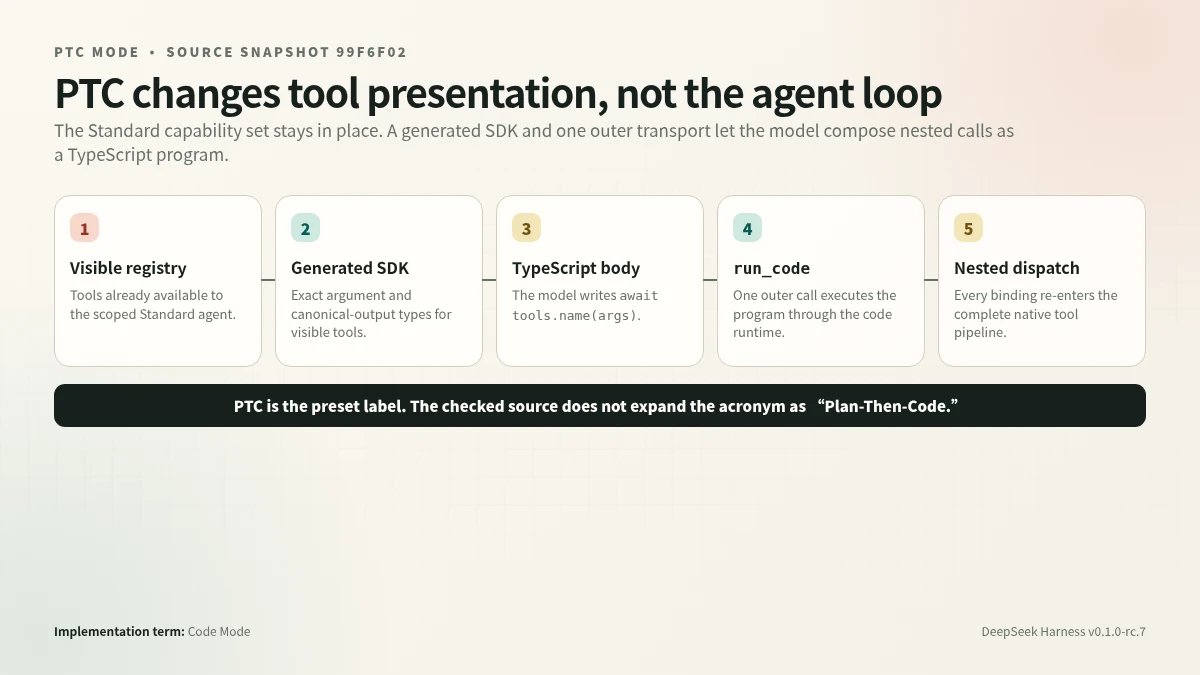
PTC retains the Standard agent composition and inserts a generated SDK plus the run_code transport between the model and the existing tool registry.
PTC Mode vs Standard Mode
PTC (Code Mode) inherits its capability set by copying the Standard preset’s agent-plane composition rather than extending it at runtime. The Standard preset describes itself as a full coding agent supporting file editing, shell, file and web search, skills, planning, goals, subagents, and workflows. PTC’s composition header states explicitly: “Everything in standard is here unchanged”. The tool rows—shell, web search, file operations, and the rest—appear in both files; registrations land in the preset’s scoped layer, while only services genuinely owned by the preset use explicit isolate realms.
The single mode-specific addition is a tool-presentation row. Instead of issuing one tool call per action, the model writes a TypeScript program against a generated SDK and a run_code executor runs it, collapsing what would otherwise be multiple round trips into one. This change affects only how the existing registry is presented to the model within that agent’s session; it does not add or remove underlying capabilities.
Ownership of infrastructure remains on the host plane. The host compositions (base.cordis.yml + web.cordis.yml) retain the registries themselves, the sandbox and approval stack, persistence, and the model route. A preset composition is explicitly prohibited from owning these resources; it operates strictly within a single agent’s scope context.
Generated Code Mode SDK
The principal distinction of Code Mode’s model-visible API is that the live tool registry collapses into a single run_code transport plus a deterministic, type-complete SDK regenerated at each prompt assembly—rather than exposing every tool as a separate callable schema.
When presentation is set to code, the registry selects a renderer keyed by ctx.codeRuntime.language (currently 'typescript' or 'python'). The TypeScript flavor emits JsonValue, per-tool ToolArgsMap and ToolOutputMap types, a ToolName union, the ToolCallError declaration, and a mapped tools namespace whose members correspond to the calling scope’s visible capabilities (exotic names use quoted keys). Each binding call resolves to the tool’s canonical JSON value and dispatches through the full tool pipeline under the native scheduling contract—concurrency-safe calls may overlap up to maxParallelSubCalls; exclusive calls serialize as ordering barriers.
Only the program’s printed logs and return value re-enter the model conversation as outer output. The run_code result envelope is { logs: string[], result?: JsonValue }; strings render raw, other JSON roots pass through a stack-safe pretty-printer capped at ten characters of indentation, and absent result means the program returned undefined. Image-bearing sub-tool results are deferred through the parent result so they are not lost behind the JSON-only binding. Failed sub-calls reject with ToolCallError carrying only toolName and message; native content and internal error codes remain outside the code contract.
run_code Dispatch Bridge
The central distinction of the run_code dispatch bridge is that it converts each tool-binding call inside a model-authored program into a fully-pipelined nested tool execution, reusing the same stage sequence that a direct model call would traverse.
When the model emits a run_code invocation, the harness executes the code body through the configured code runtime (selected by ctx.codeRuntime.language). The generated SDK exposes typed bindings for every visible tool; each binding call snapshots its arguments as lossless JSON—rejecting undefined, BigInt, cycles, sparse arrays, -0, and exotic objects—and submits the call to a per-run scheduler.
Each nested dispatch carries the outer execution’s opaque token as parent, logs a tool/code-dispatch event, and traverses the complete stage sequence: pre-execute waterfall → monotonic guards → execute waterfall (around-dispatch/body) → post-execute waterfall → result normalization → finalizeContent → tools/result notification. Denials surface to the program as binding rejections; successes return the canonical value after policy; failures become a ToolCallError(toolName, message).
Scheduling follows the native concurrency contract: calls start strictly in submission order, concurrency-safe calls overlap up to maxParallelSubCalls (default 10; 1 restores serial), and an exclusive-classified call drains the pool, runs alone, and bars later calls until committed. Classification is re-read immediately before each start, matching the native scheduler’s lazy reclassification. A run-scoped abort tied to the outer signal ensures in-flight sub-tools terminate on budget expiry rather than orphaning, and the bridge drains its queue before returning so every dispatch event lands inside the open turn.
Concurrency Ordering
The scheduler distinguishes two phases of each sub-dispatch: ordered policy stages (start-append, pre-execute guards, post-execute finalize, commit-append) that run inside a single driver lane, and the dispatch body (around-dispatch/execute) that may run concurrently. Only the body stage overlaps; ordered stages never do.
Consecutive calls classified isConcurrencySafe overlap up to maxParallelSubCalls (default 10; setting 1 restores serial dispatch). An exclusive-classified call waits for the in-flight pool to drain completely, executes alone, and holds its barrier until its commit—including post-execute—completes before any later call may start. Tests confirm that safe reads already in flight must settle before the exclusive call begins, and that a trailing safe call cannot start while the exclusive call is active.
Despite body overlap, starts are strictly submission-ordered and results commit in submission order through a head-of-line cursor. This means the external event log reflects the order in which the program issued calls, regardless of which body finishes first. The driver lane sleeps when the head-of-line dispatch has not yet settled and wakes when a body resolves or a new submission arrives.
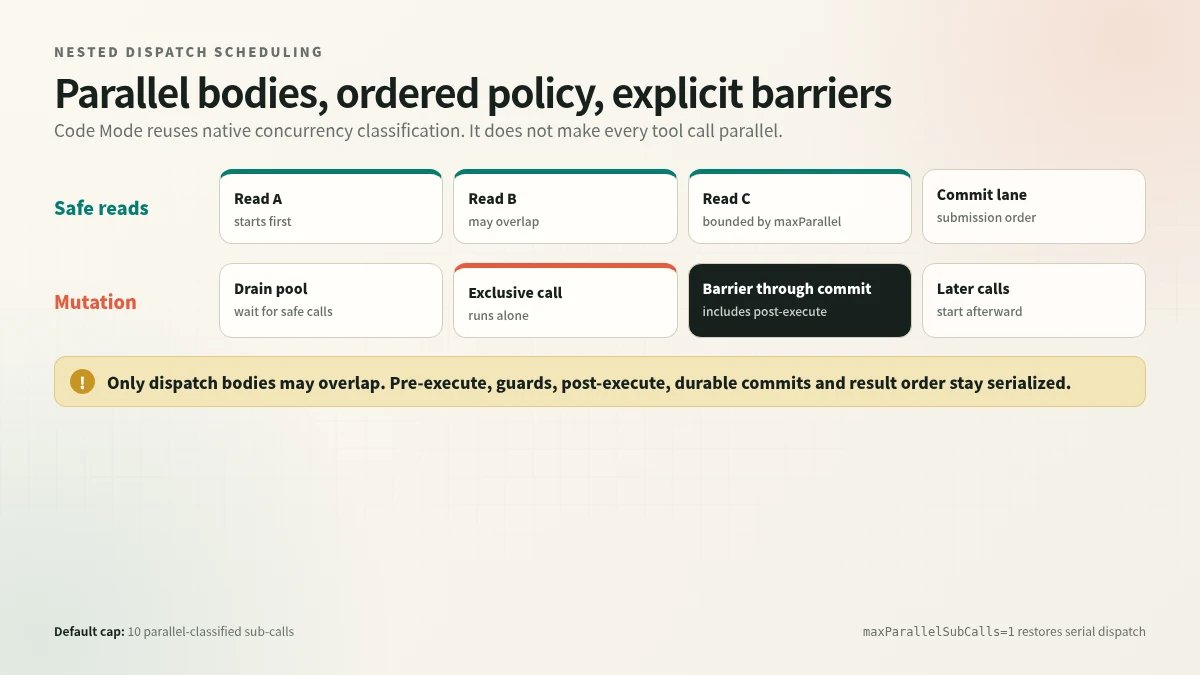
Concurrency-safe bodies may overlap, while policy stages, exclusive barriers, and commits remain ordered.
Conversation Context Boundary
The principal distinction in PTC mode’s context handling is between what the executing program can access internally and what re-enters the model’s message history. Inner canonical values—the intermediate results of sub-calls resolved within a run_code program—are available to the running code but are never individually surfaced as model messages; deriveMessages() emits neither the dispatch events nor these per-binding values.
What the model receives is the curated outer result: the run_code tool’s canonical return shape { logs: string[], result?: JsonValue }, where strings render raw and other JSON roots are pretty-printed with indentation capped at ten characters. Image-bearing content and additionalContexts from successful sub-calls are deferred through the parent ToolRunContext in dispatch order, appended only after the parent result to preserve call/result adjacency and source attribution.
Nested dispatch events (tool/code-dispatch-start and tool/code-dispatch) remain durable in the session log with deterministic IDs (<parent>:code:<n>) and full content/isError payloads in the tool/result vocabulary. These enable trace reconstruction and UI rendering of sub-rows, yet they are explicitly excluded from derived model messages. A queued call abandoned by run settlement logs neither event.
This design keeps ordinary nested tool results out of derived model messages and retains one outer run_code call/result pair, while separately forwarding image-bearing content and additional contexts and preserving full dispatch observability for replay tooling.
Failure Semantics
PTC mode distinguishes program-level outcomes from nested tool-call failures, and the bridge enforces a deterministic drain before the outer run settles.
A failed nested tool call surfaces inside the running program as an instance of the runtime’s configured error class (exposed via the errorClass binding descriptor), allowing the program to catch and handle it like any other exception. The runtime itself never rejects its run() promise for program-originating problems; instead it resolves with a CodeRunResult whose error field carries a CodeRunFailure with an orthogonal kind taxonomy covering: parse/transform failure, thrown exception, invalid completion, output overflow, budget expiry, abort, and substrate death. Rejection of run() is reserved exclusively for caller misuse of the Service Definition contract.
When the run settles for any reason, the bridge’s run-scoped AbortController fires immediately. This signal propagates to every in-flight sub-dispatch (whose executor kills on it) and causes queued-but-unstarted dispatches to be abandoned, preventing orphaned work. The outer execution signal feeds into this controller as well: if the caller cancels, the run-scoped controller aborts with the outer signal’s reason. Only after all outstanding dispatches drain does the outer run_code invocation settle and produce its result content parts.
Side Effects and Isolation
PTC Mode does not provide transactional rollback for tool calls executed during a program run. When a sub-call settles successfully but the program subsequently fails, “ordinary side effects are not rolled back”; the failed run surfaces as a CodeRunFailedError, yet any mutations performed by earlier sub-calls persist. Sub-call additionalContexts entries are still deferred through the parent result to preserve adjacency, but the underlying external state changes remain committed.
The isolation field exposed by the CodeRuntime seam is a readonly descriptor whose value—'worker-thread', 'process', or 'container'—is explicitly “a label for deployments and diagnostics, not a security claim”. The worker-thread backend states its trust posture as “bash-equivalent by design,” offering containment properties bash lacks (separate isolate, empty environment, heap cap, hard termination) without constituting a hard security boundary. A container backend is described as the path to such a boundary; it has no published implementation.
Only the TypeScript worker-thread backend ships in the checked snapshot. The values 'process' and 'container' are declared well-known isolation labels “with no implementation”. The language descriptor similarly notes that only 'typescript' has a published backend. Consumers that encounter an unpresented language are expected to fail loudly rather than degrade silently.
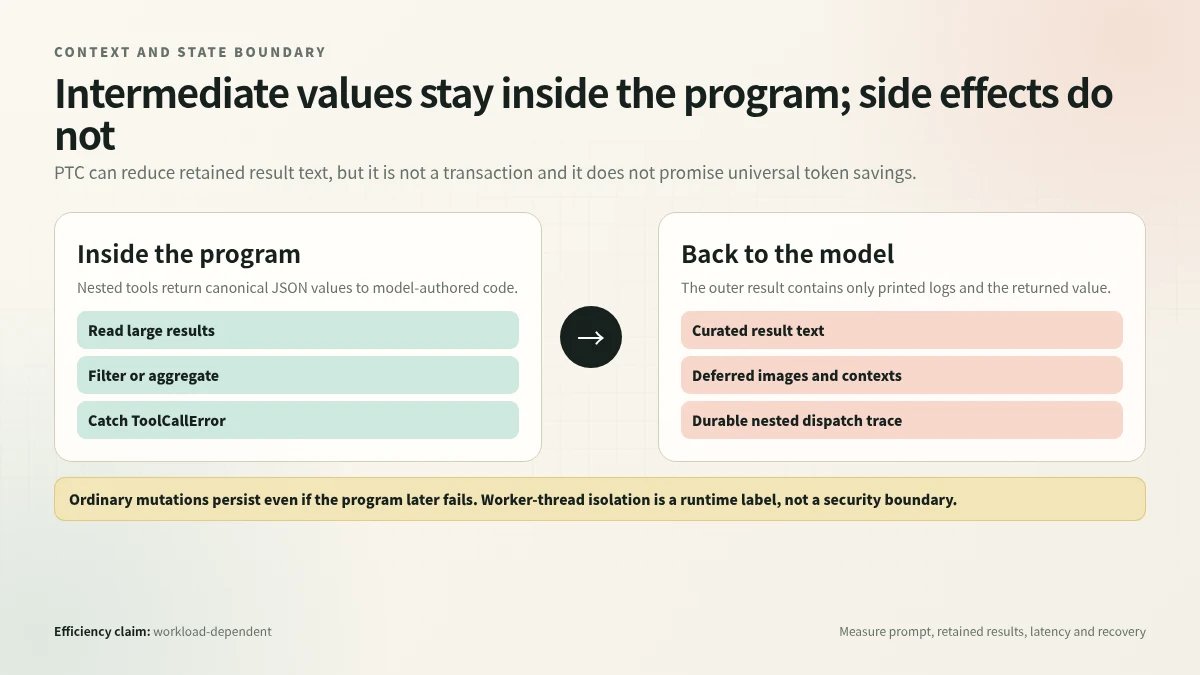
Intermediate values can stay inside the program, but ordinary external side effects persist and worker-thread isolation is not a security boundary.
Token Economics
Code Mode replaces per-tool JSON schemas in the prompt with a single run_code schema plus a generated TypeScript (or Python) SDK declaration, consolidating what would otherwise be many individual tool definitions into compact typed function signatures. This substitution does not promise universal prompt reduction: the generated SDK text itself occupies tokens, and for deployments with few tools the net savings may be negligible or negative.
Where Code Mode most reliably reduces token growth is in conversation history. When intermediate tool results are large—say, a multi-megabyte file listing—the run_code program can process that data internally and return only a compact aggregate via the canonical { logs, result } envelope. Because only the final logs and return value re-enter model context, the retained-result portion of the conversation grows with the summary rather than with the raw intermediate output.
Before adopting Code Mode, measure at least five dimensions on representative tasks: (1) prompt tokens at each turn, comparing native presentation against code presentation; (2) retained result tokens across a full session; (3) end-to-end latency, including the worker execution time that run_code adds; (4) error-recovery cost, since a CodeRunFailedError or ToolCallError still consumes context tokens and may require a retry turn; and (5) reviewability—whether logs and returned values give operators enough visibility for approval workflows. The evidence does not supply benchmark numbers for any of these dimensions; treat published efficiency claims as task-dependent until validated on your own workload distribution.
When Should You Use PTC Mode?
Use PTC Mode when a task benefits from programmatic orchestration, not simply because it is available. The strongest candidates have repeated reads, independent searches, structured filtering, or several tool calls whose raw intermediate outputs do not need to re-enter the model context.
| Prefer PTC Mode | Prefer Standard Mode |
|---|---|
| Several tool calls can be planned together | The next action depends on interpreting each result |
| Intermediate data is large but the final answer is small | The task needs one or two simple calls |
| Independent reads can run concurrently | Human approval is needed at every visible step |
| A typed program makes ordering explicit | Interactive exploration is more important than batching |
Treat the choice as an experiment: compare success rate, retained tokens, latency, and reviewability on the same representative tasks. The source establishes the mechanism, not a universal performance advantage.
PTC Mode FAQ
Does PTC mean Plan-Then-Code?
Not in the reviewed source. The shipped preset is labeled PTC Mode, while its implementation uses the Code Mode SDK and mode: code. No checked official file expands the acronym.
Does PTC Mode have fewer tools than Standard Mode?
No. It keeps the Standard capability set but presents those tools as typed SDK bindings behind run_code.
Does run_code bypass approval or sandbox policy?
No. Nested SDK calls re-enter the normal tool pipeline, including policy, guards, dispatch, and post-processing.
Does PTC Mode automatically save tokens?
Not always. It can keep large intermediate results out of conversation history, but the generated SDK also consumes prompt tokens. Measure the net effect on your workload.